The best website localization services: Translation software and other tools


When you’re hoping to enter new markets, the first thing you should do is translate your website into your target audience’s native language. But the work doesn’t stop there: to provide them with high-quality user experience, you’ll need to localize your website content.
So, in this post, we’ll review the website localization process. Then, we’ll explore how you can use Weglot, our no-code website translation software, to quickly and accurately create a multilingual website.
Finally, we’ll look at other website localization services you may want to consider, including:
- Localizing your checkout experience
- Localizing form fields
- Localizing your brand image
Let’s get started.
Note: Ready to translate your website into its new language? Skip the article and start your free trial.
The website localization process
Localization is the process of adapting your product or service to specifically meet the needs of your target market. Likewise, website localization means modifying your original website by adjusting the design, language, and cultural elements to resonate with your new audience more precisely.
A similar concept you’ll encounter is website internationalization. This involves setting up your website so that it seamlessly handles different languages for your international markets. When taken together, your localized website will definitely woo your potential customers.
1. Detect your content
The first step in your website localization project is to detect all the content on your website. Though this sounds simple at first, you’ll quickly realize that there are many parts of your website that aren’t immediately visible, whether through your main navigation or smaller menus.
Not being able to translate key pages will definitely harm your entrance into a new market. That’s why automatic content detection is a crucial part of the process: it immediately detects all content on your website, even images and dynamic content. Being able to automate this step will immediately save you hundreds of hours!
2. Set translation rules
To ensure that your website translation retains its high quality, you’ll need to set some rules. By this, we mean style guides, glossaries, implementing the right formats, and more.
Why is this important? So you don’t manually have to edit words you don’t want translated, like brand or product terms. This will make it easier to keep a consistent website across the local languages you’re targeting. Weglot’s translation management system is designed to make this as simple as possible through its intuitive interface.
3. Choose your translation method
There are three translation solutions for you to choose from:
- Machine translation only
- Human translation
- A mix of both
Human translation is a great method for getting top-quality translations. However, it’s notoriously expensive, both in terms of time and money.
On the other hand, machine translation is incredibly useful—we’re big fans of it at Weglot! But not everyone feels comfortable using the raw output without any editing. That’s why using a mix of both is the best way to get quality translations to impress your new customers.
Using website translation software like Weglot gives you a first layer of machine translation. Though it eliminates a lot of the initial work of translating your website, you then get 100% control over these translations and are free to edit them through the Dashboard.
Looking for more specific ways to address your localization needs? You can also add your team of localization experts to your translation project. With instant access to your website, they can easily proofread the output and help you with your content management.
4. Publish your multilingual website
And you’re done! Your multilingual website is ready to go live.
The process won’t ever be completely done, though. You’ll eventually need to look at smaller—but still important—aspects of your website. This includes translating your images and other multimedia, refreshing your content and reviewing the translations, and so on to maintain an intuitive user interface for your audience.
But other than that, your website is definitely ready for your global markets!
You may be wondering about technical aspects like your international SEO URL structure and displaying your content under subdomains or subdirectories. The good news is that Weglot automatically displays your content under language-specific structures (depending on your CMS). So you don’t have to worry about managing separate websites for each language version.
Best website localization services: Translating your website with Weglot
Weglot is a no-code tool that you can easily add to any CMS/website. Here’s a quick video that shows you how it’s done.
Once added, you can use Weglot to translate your entire website within minutes.
Just set up your account, pick what language your site is currently in, and then your target language (i.e., what you want to translate your site into). FYI: You can translate your site into more than one language – as of this writing, we offer over 100 different languages to our customers (including custom languages such as French-Canadian).
Weglot automates the translation workflow for you. But you can still exclude any specific URLs, blocks/sections, or even words that you don’t want to be translated.
It also translates your site accurately and quickly because it uses machine translation from leading providers in the field, including:
- DeepL
- Google Translate
- Microsoft Translate
About ⅔ of our customers never make an edit to their translated content. No need to worry about quality assurance — it’s that good. But when localizing your website, you want to be able to access your translations so you can customize or modify them as needed. And that’s what we cover next.
How to edit your translations with Weglot
You can access all of your translations from your Weglot Dashboard. You don’t need to download or extract any files.

You can look up specific translations by selecting a specific URL or by searching for a word or phrase.
You can also use Weglot’s Visual Editor to see a live version of your site.
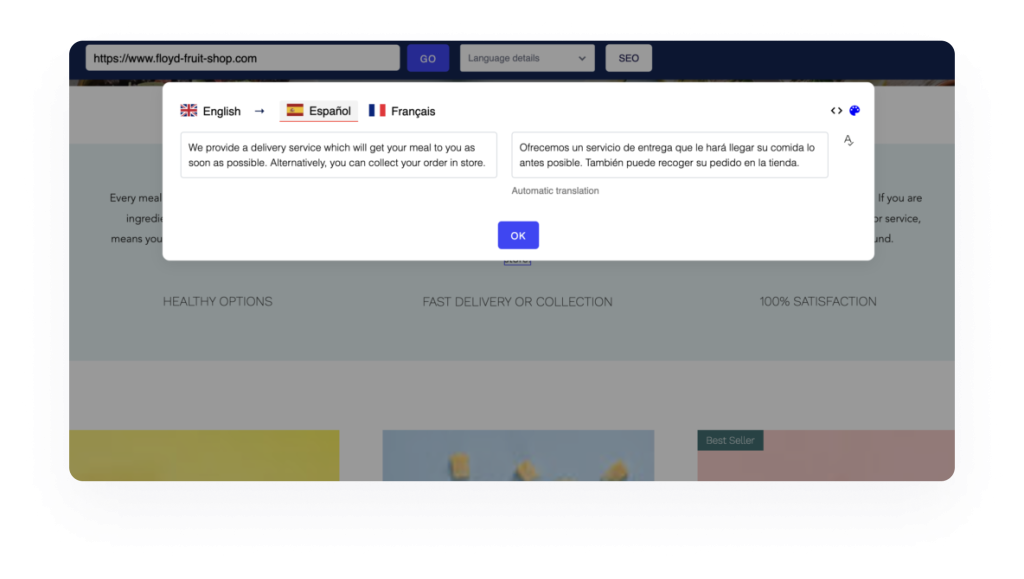
When you find the content you want to review or edit, just make the changes right then and there. Any edits are saved in real-time. The Visual Editor is great for making sure you don’t have overlapping text or any broken designs on your new site. Thanks to its easy user interface, you’ll always see your translations in context.
Plus, you can order professional translation services through Weglot
If you have a translation team, great. They can log in and use Weglot’s translation management platform to review the translations. But if you don’t have a team ready to go, you can hire translators through Weglot’s Dashboard.
For example, with Weglot you get a first layer of machine translation to quickly translate your entire website. Then you can hire a translator through Weglot to review high-priority or high-editorial content, like product pages or blog posts. It also features a translation memory to keep your translations more consistent across all your different languages.
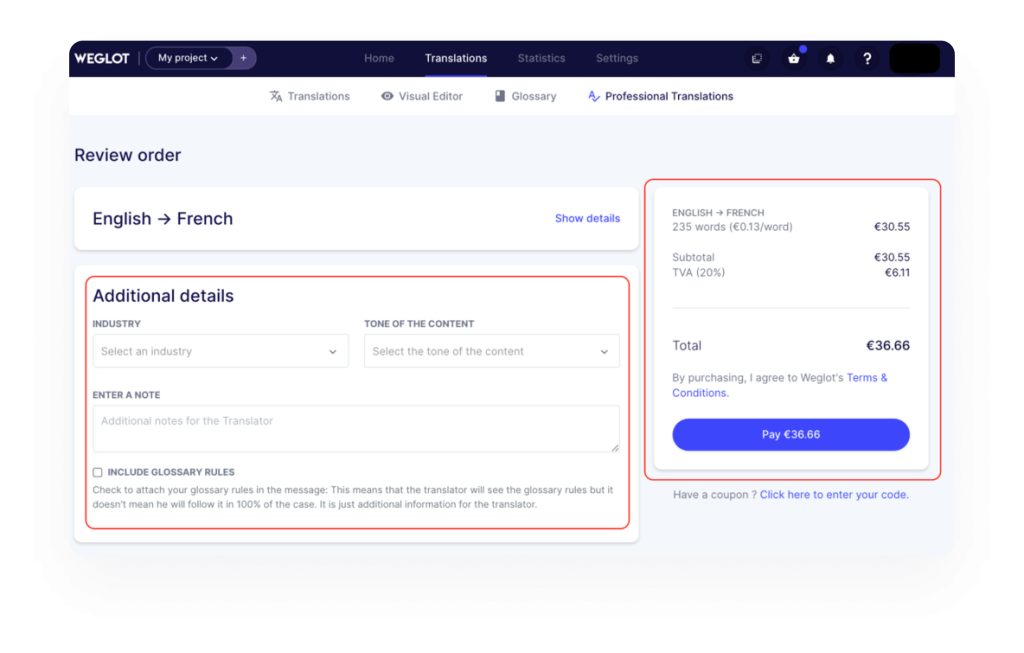
Just mark which translation you want to be reviewed, pay, and your work order is created. Your site is automatically updated when the content has been professionally reviewed and approved within 24-48 hours.
This two-layered process – of using both machine translation and human translators on an as-needed basis – allows you to quickly and affordably localize your website, without sacrificing quality or jeopardizing your brand’s image.
Multilingual SEO with Weglot
The goal of localization is to make sure your new site is well-received by its new audience. Weglot helps you do that, and it helps you increase the size of your new audience, as well.
Weglot helps with your translated site’s search engine optimization (SEO) in three key ways:
- On-page SEO elements are automatically translated. This is your metadata and alt tags. Plus, you can edit these translations to ensure your pages are optimized for the exact SEO keywords you want to target.
- Weglot automatically creates subdomains/subdirectories for your translated sites. Your translated site will be hosted on a subdomain or subdirectory of your main site. For example, weglot.com is our English site, while weglot.com/de/ is our German site. This is also a best practice for localization, as your German customers are going to be looking for that /de/ in the URL.
- Finally, Weglot adds code to your site, so search engines know you have a multilingual site. When search engines crawl your site, they’ll see code signifying that you have translated versions of your site available. This helps them properly index your site in all of its available languages.
Combined, these factors help your translated site rank for the right audience.
Next steps: localize your site with Weglot
Translating your site isn’t the only part of localization – but it’s one of the most significant parts. And it can be challenging for websites to do it accurately, affordably, and quickly.
With Weglot, you can use our two-layered translation process to fully localize your site:
- The first layer is translating your content with machine translation. Depending on your specific localization project, this might be the first and last stop of your translation process. Weglot can translate most sites within minutes.
- The second layer is on an as-needed basis, and it’s editing your translations. You can use your own team of translators, or you can hire translators through your Weglot Dashboard. You can easily access your translations, and make edits without having to worry about document management or downloading and uploading files.
Plus, Weglot translates your site following the best practices of multilingual SEO, to help you increase the size of your audience.
If you’re ready to start localizing your website, sign up for your free trial today.
Other website localization services
Below we look at two other factors to consider when localizing your website.
1. Localize your checkout experience
Translating your site into the right language will help new users find and navigate your website. But if you’re selling products, you also want to make sure they can make a payment.
This involves localizing your checkout experience.
But here are the questions you need to ask yourself:
- What are the most popular payment methods for my new audience? Here are some examples. If you’re branching out into a German market, then you’ll want to consider offering PayPal and open invoice payment methods (where payment is issued after delivery). In South Korea, there are specific-to-Korea payment methods like BC Card and Lotte Card that their internet users prefer.
- What information does my customer need to provide? You may not need a physical address if you’re selling software or a digital subscription. But you might need to let your customers add a country code for their phone number. If you’re selling a physical good that will get shipped to your customer, then you need an address. Again, this will require custom form fields.
- What currency will your prices be displayed in? Ideally, you want the currency of your product’s prices to match the national currency of whatever domain your site is in. For example, if a customer is on your French site, then prices should be displayed in Euros. If a customer is on your Polish site, then prices should be in zloty.
Unlike website translation, which we covered above, each of these requires a more hands-on, development process. While leading CMS platforms (Magento, Shopify, WordPress) have plugins or extensions to help with this, a more custom approach will be required on other CMS platforms.
2. Localize your images and marketing materials
Then there’s localizing your images and marketing materials. While this does matter, it’s last on our list because it’s not the main focus until you’ve made sure your site is accurately translated and that your customers can buy or sign up for your service.
Also, unlike website translation or having your developers customize contact forms, localizing images and marketing materials takes significant user and cultural research. This means, there isn’t a go-to tool for this part of localization.
Instead, you need to find out: how your images, your site’s design, and your marketing materials, will be received by your new audience.
To help you get started, here are some questions you should ask yourself:
- Do my visuals/images fit within the accepted norms/best practices? This depends heavily on your industry and what country you’re expanding into. If you’re an eCommerce store you’ll need images of your product and perhaps people using your product. If you’re an agency or software company, you might spend more time on the logos and brand colors.
- What are the sales trends and holidays? Do your research not just on what holidays are celebrated, but whether or not those holidays are considered sales holidays.
Here’s a recent example of localization gone wrong – KFC used an automated email generator to plug in calendar days of significance with promo emails. The problem is KFC sent out emails on a day of mourning/remembrance in Germany’s history, and not a day of celebration. This is the exact opposite of localization. By not paying attention to what they were promoting, KFC managed to alienate and anger their German customer base.
Next steps: Translate your site to start website localization
The first step of website localization is translation. By translating your site, you expand your site’s reach.
Unlike the other two aspects of localization – localizing checkout experience or contact forms and localizing images and marketing materials – you can start translating your site without developers or designers.
Weglot can translate your entire site within minutes. If necessary, you and your team of translators can access your translations without downloading or extracting any files. And if you want someone to review your translated content, but you don’t have translators, then you can order translation services directly through Weglot.
This gives you control over how much customization you have with translations – making Weglot a perfect tool for localization.

Time to open your website to the world
Get started for free and have a multilingual website up and running in minutes.

Ready to display your website in multiple languages?
Install Weglot on your website in minutes and manage your translations easily.

Share on